I have lived this nightmare three times in my life. The first time, it was a hard drive that I had accidentally plugged in to a wall socket that was tied to a light switch. People came in and out of the room, turning off the light and rebooting the hard drive without knowing it. It was 120GB. Lost.
Second time, it was an external that just fell off a desk. I cried. 1 terabyte (about 1024GB). Lost.
Third time, another external hard drive died for no apparent reason. It'd just reached the end of its life.
At this point, I had learned my lesson. All. Hard drives. Die. It has nothing to do with how careful you may be, or how safe the drive is, or how expensive or cheap your drive is. These drives are mechanical, and do eventually die. It's important to keep in mind that any and ALL data on this drive WILL eventually be lost. Think about it that way. Whether it's on the internal drive of your computer, or on the external, it WILL get lost.
UNLESS...
You keep a copy.
Making copies is tedious, and even software that does it automatically isn't 100%. It also means you have to purchase a second drive just to hold the copy. I personally don't like doing this, but if you're fine with it, you can stop reading this post.
My solution goes as follows:
The first, easiest, and most important storage solution everyone must have is some basic cloud storage.
Store your documents and anything important on Google Drive, Dropbox, Skydrive, wherever. If you're smart, you'll pay the $5/mo to increase your Google drive storage to 100GB. Move your photo library onto the Google Drive folder, as well as your documents folder on the computer. Always save stuff to this folder, always work off the folder. The day your internal hard drive dies (and trust me, it WILL), you will still have all your stuff safe and sound in Google Drive.
For most people, this will suffice.
For those of you who have large libraries of massive stuff (sound libraries, HD video footage, etc.), you will need to invest in some kind of big fat RAID box. I use a Drobo Mini. It takes four hard drives. It's great. After buying a few terabyte hard drives to fill it, you'll end up spending about $800, but these advanced gizmos have self file-copying technologies, so when one drive dies (and it WILL), you won't actually lose any data. You just need to go out and buy another drive to replace the dead one, and it'll be back up and running, with all your files intact. This is AWESOME.
Anyone with irreplaceable files that you never want to lose (photos, videos of your family, songs you've recorded, any files you're getting paid to work with, etc.) should at LEAST have a basic paid Google Drive account (or similar).
Just remember. All the hard drives in your home/office. (Internal, external, etc.)
WILL
EVENTUALLY
DIE.
Tuesday, October 22, 2013

Wednesday, August 14, 2013
Beginning Photography Lenses
A few months ago, I decided to buy a DSLR camera. I got into photography fairly quickly, and learning about photography consumed a LOT of my time. Here is some of my work.
A question I get a lot from beginners is what kind of equipment they should buy next.
There's a few things one should know about the gear they have with the first camera they buy.
1. There's a good chance your camera came with an 18-whatever mm f/3.5-5.6 zoom lens. There's a lot I can say about focal lengths, and aperture, etc., but I'm going to boil it down to this: The smaller the f-stop, usually the better the lens. Having to be at 18mm just to get an f-stop of 3.5 is not great. Low f-stops means more light coming into the camera and more bokeh (that dreamy blurry-background look).
2. Zooming doesn't just makes things seem closer or farther. Zooming in and out actually changes the apparent shape of your subject.
Try this: zoom all the way out to 18mm and take a picture of your buddy, with their face filling the frame, head to chin. Then zoom all the way in as far as your lens will allow, and take the same photo with the same framing (you will have to step back).
You will see a difference that looks like this:
 Moral of the story: Wide focal lengths (anything 35mm and below) produce fat noses and weird shapes. They're great for large groups or landscapes, but it's not as flattering of an image as telephoto (zoomed-in) photos, (anything higher than 50mm). The 35mm-50mm range is considered somewhere in the middle.
In conclusion, buy one of two lenses: a 35mm or 50mm prime.
Prime lenses don't zoom, but the trade-off is a lens that takes amazingly sharp images (much sharper than the lens your camera came with) and great low-light and bokeh performance.
What does this mean?
The lens works well in dark situations.
Here's a photo i took with the lights off in my living room and no flash.
And for bokeh, here's an example
WHAT TO BUY
For Canon users:
- The super popular nifty-fifty, plastic-fantastic: the 50mm f/1.8
It's a must-have for Canon users. I think it's their cheapest lens, but it takes some stunning images.
- OR for a comfy walk-around lens, the coolest little pancake, the 40mm 2.8
It's a comfortable focal length, and at f/2.8, bokeh is definitely possible.
For Nikon:
The 35mm 1.8G or 50mm 1.8G
A question I get a lot from beginners is what kind of equipment they should buy next.
There's a few things one should know about the gear they have with the first camera they buy.
1. There's a good chance your camera came with an 18-whatever mm f/3.5-5.6 zoom lens. There's a lot I can say about focal lengths, and aperture, etc., but I'm going to boil it down to this: The smaller the f-stop, usually the better the lens. Having to be at 18mm just to get an f-stop of 3.5 is not great. Low f-stops means more light coming into the camera and more bokeh (that dreamy blurry-background look).
2. Zooming doesn't just makes things seem closer or farther. Zooming in and out actually changes the apparent shape of your subject.
Try this: zoom all the way out to 18mm and take a picture of your buddy, with their face filling the frame, head to chin. Then zoom all the way in as far as your lens will allow, and take the same photo with the same framing (you will have to step back).
You will see a difference that looks like this:
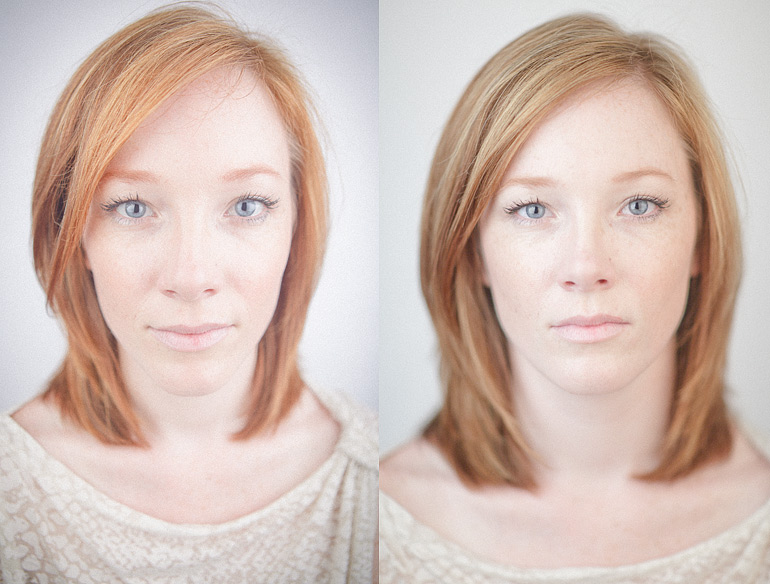
In conclusion, buy one of two lenses: a 35mm or 50mm prime.
Prime lenses don't zoom, but the trade-off is a lens that takes amazingly sharp images (much sharper than the lens your camera came with) and great low-light and bokeh performance.
What does this mean?
The lens works well in dark situations.
Here's a photo i took with the lights off in my living room and no flash.

And for bokeh, here's an example

WHAT TO BUY
For Canon users:
- The super popular nifty-fifty, plastic-fantastic: the 50mm f/1.8
It's a must-have for Canon users. I think it's their cheapest lens, but it takes some stunning images.
- OR for a comfy walk-around lens, the coolest little pancake, the 40mm 2.8
It's a comfortable focal length, and at f/2.8, bokeh is definitely possible.
For Nikon:
The 35mm 1.8G or 50mm 1.8G
Tuesday, June 4, 2013
Wife and i made some bread
Bread is fun to make and eat. Here are some pictures.
Bread makes you fat, so my suggestion is as follows:
Buy a 2 lb bag of all-purpose flower, and seriously don't buy any bigger.
Otherwise, you will end up making a bunch of bread and you will gain 14 lbs guaranteed.
Anyway, recipe (as stolen off my buddy Evan Santiago) is as follows:
Stuff you need:
- 1.5 tb Quick-rise yeast (i used this)
- 2 lb bag of of all-purpose flour (6.5 cups)
- 1.5 tb salt
- 3 cups water
- butter
- a lil canola oil
- bread pan. Forgot what size ours is. It's like the size of a shoe.
1. Yeast + salt + water into bowl. Let it sit 5min, or until it bubbles.
2. Throw in the flour. Grease up a fork with some canola oil and mix it all up. Mix it real good.
3. Cover your dough (leave a crack). Let your dough sit for an hour.
4. Preheat oven to 450, bake for 35min.
5. Let the bread cool for a few min and cut it with a serrated knife. Don't push on it, saw it downnn.
6. Eat your bread, but not all of it, cuz you'll get fat.
7. Bake the second batch of dough, but give it all away. Don't be a fatty.
Bread makes you fat, so my suggestion is as follows:
Buy a 2 lb bag of all-purpose flower, and seriously don't buy any bigger.
Otherwise, you will end up making a bunch of bread and you will gain 14 lbs guaranteed.
Anyway, recipe (as stolen off my buddy Evan Santiago) is as follows:
Stuff you need:
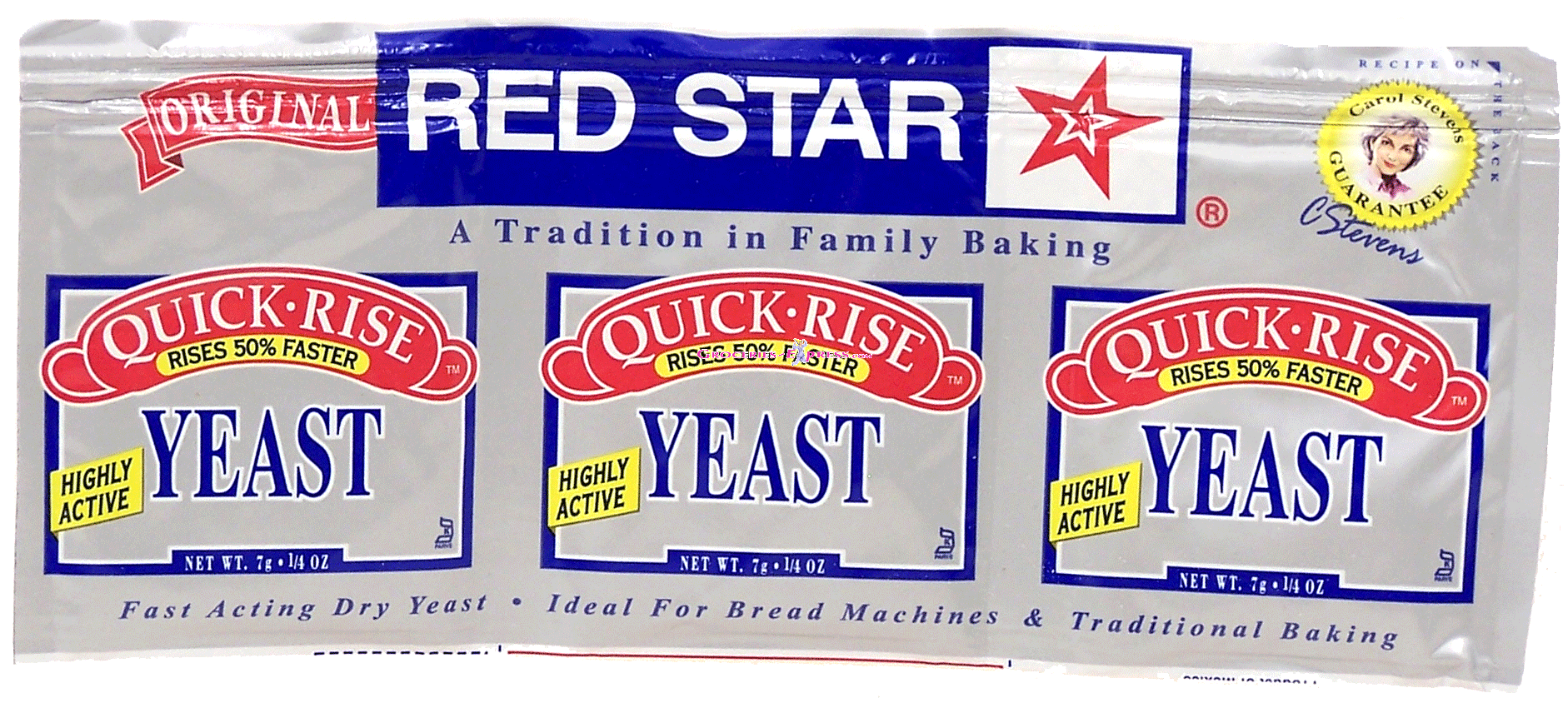
- 1.5 tb Quick-rise yeast (i used this)
- 2 lb bag of of all-purpose flour (6.5 cups)
- 1.5 tb salt
- 3 cups water
- butter
- a lil canola oil
- bread pan. Forgot what size ours is. It's like the size of a shoe.
1. Yeast + salt + water into bowl. Let it sit 5min, or until it bubbles.
2. Throw in the flour. Grease up a fork with some canola oil and mix it all up. Mix it real good.
3. Cover your dough (leave a crack). Let your dough sit for an hour.
4. Preheat oven to 450, bake for 35min.
5. Let the bread cool for a few min and cut it with a serrated knife. Don't push on it, saw it downnn.
6. Eat your bread, but not all of it, cuz you'll get fat.
7. Bake the second batch of dough, but give it all away. Don't be a fatty.
Wednesday, August 1, 2012
Back up or else
So I lost all my pictures. About 7 years worth. (Somewhere in 2005, cellphones started having serious cameras, which is when ppl really started taking a serious amount of pictures).
This has happened to me about 4 years ago. I keep my iPhoto library on an external hard drive, and when it happened the first time, I had a backup on a second drive. Honestly, i had no idea, and I almost cried with excitement, and of course, i did not learn from this crisis, and continued to live my life with only one copy of my files.
Years later, in 2012, my hard drive started actin up. It happened again. And this time, there was no true backup. I post a LOT of my pictures on Facebook, and I sync my iPhone with about a year's worth of pictures, so it's not like everything was totally gone. But this was definitely a wake-up call for me. It's time to get serious about back up. And i don't mean back up as in putting things on hard drives (which can all be lost in a fire), I mean serious off-site back up in a cloud somewhere.
So the big choices are the following:
Box.com
DropBox
Mozy
iCloud (from Apple)
SkyDrive (from Microsoft)
Google Drive
Let's go over my basic needs:
1. I don't want a backup solution that requires me to remember to click on something, or drag something somewhere, etc. I have a bad memory and poor discipline for these things. (Imagine putting it off for months, and losing an entire summer trip's worth of photos).
2. I would like a desktop Mac client, i.e., software that I can install on my computer that works in the background and is regularly syncing my files to the cloud server.
3. If i have to pay for service, it has to be as inexpensive as possible. And by that I mean single-digit cheap.
So let's go!
Box.com is awesome, but the Mac desktop client requires a Business account, which costs $15/mo. There's also the issue where Box doesn't allow files that are larger than 2GB, even on Business accounts, and that irks me. It should irk you too.
Cost: $15/mo (100GB)
DropBox is (for this purpose) even better than Box. You get a desktop client for free, and it works phenomenally well and seamlessly with Mac OS. But you only get a few GB with a free account, so upgrading will be necessary for storing your photo library (which you SHOULD do, because photos can NOT be recovered when your hard drive crashes. And it will.) The problem is that DropBox's prices aren't that great. Their cheapest paid service is $10/mo, and that's just not cuttin it for me.
Cost: $10/mo (100GB)
Mozy is super cool, and works just like DropBox, except their solution is more geared towards backup rather than just cloud storage. Their pricing is decent, but not the best.
Cost: $6/mo (50GB)
iCloud is made by Apple and therefore simple and amazing, and is actually surprisingly inexpensive. Unfortunately, their storage options (even their most expensive one at $100/yr) is only 50GB, which is just not enough for me. Also, they currently don't have an actual cloud storage solution (like a folder you can access files from).
Cost: about $8.33/mo (50GB)
SkyDrive is a Microsoft product. In my book, that makes them lose. But, in all seriousness, they probably have the best offering (even price-wise) on this list, but they force you to pay a yearly subscription in a lump sum if you're trying to get paid service, and their maximum storage capacity is 100GB (which is my personal minimum). My real reason for being against lump sums is that this market seems to change a lot, and new features come out for different providers. I wouldn't want to be stuck with the same obsolete service for a whole year.
Google Drive is my favorite. It's very cheap, and you don't have to pay in a lump sum like SkyDrive or iCloud. It has a desktop client that is identical to DropBox, but has the advantage of having an awesome web interface, which allows collaborative editing on documents (imagine 4 ppl working on the same document at the same time). Also, their maximum storage (if you ever feel the crazy need) is 16 TERAbytes. Woah.
Cost: $5/mo (100GB)
Google Drive = winner.
This has happened to me about 4 years ago. I keep my iPhoto library on an external hard drive, and when it happened the first time, I had a backup on a second drive. Honestly, i had no idea, and I almost cried with excitement, and of course, i did not learn from this crisis, and continued to live my life with only one copy of my files.
Years later, in 2012, my hard drive started actin up. It happened again. And this time, there was no true backup. I post a LOT of my pictures on Facebook, and I sync my iPhone with about a year's worth of pictures, so it's not like everything was totally gone. But this was definitely a wake-up call for me. It's time to get serious about back up. And i don't mean back up as in putting things on hard drives (which can all be lost in a fire), I mean serious off-site back up in a cloud somewhere.
So the big choices are the following:
Box.com
DropBox
Mozy
iCloud (from Apple)
SkyDrive (from Microsoft)
Google Drive
Let's go over my basic needs:
1. I don't want a backup solution that requires me to remember to click on something, or drag something somewhere, etc. I have a bad memory and poor discipline for these things. (Imagine putting it off for months, and losing an entire summer trip's worth of photos).
2. I would like a desktop Mac client, i.e., software that I can install on my computer that works in the background and is regularly syncing my files to the cloud server.
3. If i have to pay for service, it has to be as inexpensive as possible. And by that I mean single-digit cheap.
So let's go!
Box.com is awesome, but the Mac desktop client requires a Business account, which costs $15/mo. There's also the issue where Box doesn't allow files that are larger than 2GB, even on Business accounts, and that irks me. It should irk you too.
Cost: $15/mo (100GB)
DropBox is (for this purpose) even better than Box. You get a desktop client for free, and it works phenomenally well and seamlessly with Mac OS. But you only get a few GB with a free account, so upgrading will be necessary for storing your photo library (which you SHOULD do, because photos can NOT be recovered when your hard drive crashes. And it will.) The problem is that DropBox's prices aren't that great. Their cheapest paid service is $10/mo, and that's just not cuttin it for me.
Cost: $10/mo (100GB)
Mozy is super cool, and works just like DropBox, except their solution is more geared towards backup rather than just cloud storage. Their pricing is decent, but not the best.
Cost: $6/mo (50GB)
iCloud is made by Apple and therefore simple and amazing, and is actually surprisingly inexpensive. Unfortunately, their storage options (even their most expensive one at $100/yr) is only 50GB, which is just not enough for me. Also, they currently don't have an actual cloud storage solution (like a folder you can access files from).
Cost: about $8.33/mo (50GB)
SkyDrive is a Microsoft product. In my book, that makes them lose. But, in all seriousness, they probably have the best offering (even price-wise) on this list, but they force you to pay a yearly subscription in a lump sum if you're trying to get paid service, and their maximum storage capacity is 100GB (which is my personal minimum). My real reason for being against lump sums is that this market seems to change a lot, and new features come out for different providers. I wouldn't want to be stuck with the same obsolete service for a whole year.
Google Drive is my favorite. It's very cheap, and you don't have to pay in a lump sum like SkyDrive or iCloud. It has a desktop client that is identical to DropBox, but has the advantage of having an awesome web interface, which allows collaborative editing on documents (imagine 4 ppl working on the same document at the same time). Also, their maximum storage (if you ever feel the crazy need) is 16 TERAbytes. Woah.
Cost: $5/mo (100GB)
Google Drive = winner.
Friday, December 2, 2011
The middle part
I refuse to start this blog posting with the words "I haven't blogged in a while..."
Because first of all, statistically, it hasn't been all that long. Like two months. Which some may say is long, but most people blog a lot less frequently. So anyway, let my ramblings begin.
I feel that I have come to that point in my life (although I think it's been at that point already for a bit, I'd say 2 years), where the "middle" part of my life has passed. Even though I'm still in my mid 20's and it's more like I'm passed the first "quarter", I'd call it the middle, because frankly, everything after you get married just looks like one big chunk, and everything before is the piece that precedes marriage.
I originally got this idea from the Lion King. This dude starts off as a little cub, walking around, doin damage, etc. He meets Timon & Pumba, and then a montage happens where he crosses over that "middle" section. Apparently his teen years are so unimportant that all he does
is sing and dance with a meerkat and a warthog, and suddenly he has a big majestic mane and grows into adulthood. When he meets the girl, and beats up the bad guy, he becomes king, and the movie is over.
I think I beat up the bad guy in my life already. I know what you're thinking. But no I'm not saying that I totally rid Satan's goals of destruction over my life and that I'm holy. What I am saying is that the thing that has kept me from moving forward and taking my position
in life, fell off a cliff and was eaten by hyenas. I can finally go where God wants me to go, and be the man He wants me to be. Whether it means leading a worship team for an awesome
congregation in Jersey City, or king of the jungle with the elephants and baboons.
And now, there's the girl. Who I'll be marrying in May, and is by far the most beautiful person I have ever known, and is the best zebra hunter on the savannah. Somehow I'm more in love with her every day, and as the day of our wedding approaches, I can't help but be excited to see where else God will be taking me as the loving husband and priest-of-the-home I know He's called me to be.
So as you can see...
My middle-part-movie-montage-in-the-jungle-with-the-dancing-and-stuff
is over.
...
Now comes the sequel, right?
Wednesday, October 5, 2011
Steve Jobs 1955-2011

Today, Wednesday October 5th, we lost Steve Jobs. He was sick; pancreatic cancer, 56 years old. I'm sure that the tributes are coming, the videos, the documentaries, etc., but this is my tribute to him.
His direct influence on my life goes as follows:
Steve Jobs first made an entrance into my life in 2004. I was graduating from high school, and was due for a congratulatory graduation gift from my parents. At this point, my life was like any other. Plagued by Blue Screens of Death, Comic Sans MS, viruses, and all the other nasty things that are associated with living a life under the control of Big Brother Microsoft. It was time for entering a new phase of my life, and my first Apple product was purchased.
It was beautiful. The box was beautiful. Even the cables were beautiful. It was everything I needed it to be. A small brownie-shaped white box that held every song I could ever imagine. Every moment of my life from then on had a soundtrack, and it was at the control of just my right thumb.
I had only seen the tip of the iceberg.
Three months later, I started college, where I met Mac OS X. It came in the form of a PowerBook. It had a G4 processor clocked at 1.33 GHz, and 512MB of RAM. It was the most gorgeously built machine I had ever used in my life. It ran smoothly, the software was clean and refreshing. It was invisible, yet completely integrated into everything I ever did. I was able to focus on my content, and I used it as nothing other than a computer should be. It was my canvas as an artist. Being a musician and being able to use a computer where I had no worries of crashing, security, viruses, etc., I was able to really develop what was important.
Pretty soon, the Apple products in my life grew over the years. I had a Mac, an iPod, and used all of the Apple software. iPhoto, GarageBand, iMovie; these were all embedded into my everyday life.
And then, it happened: I got a job at the Apple Store.
And then, it happened: I got a job at the Apple Store.
I worked there for about a year. It was amazing. Selling Apple products was easy, because I believed in Apple. I was able to see how amazingly well their products worked for me, so spreading this gospel to the poor, lost souls in the Windows world was just natural. This was a phase in my life where I really saw the true beauty of what Apple was trying to do. Not only were the core aspects of Macs simply better (stability, ease of use, efficiency), but the things that one doesn't even expect to be improved, were given, like unexpected perks at a hotel.
It just works.
And it works really well.
This is the philosophy that Steve Jobs himself instilled onto Apple. I remember watching a video of him giving the Commencement speech at Stanford U. This big-time CEO literally spent a few minutes actually talking about fonts. He was enticed by calligraphy and typography. He was thinking about the parts of the OS that one actually spends most of your time looking at.
At this point, Steve Jobs has more than just physical pieces of himself lying around my house (an iMac, iPhone, three iPods, a MacBook, two AppleTV's, a Mac Mini), but his philosophy, his boldness, and the unshakable firmness in the quality of his life and his work, have laid immovable foundations in my personal character.
"Stay hungry, stay foolish."
-- Steve Jobs
http://youtu.be/UF8uR6Z6KLc
Sunday, September 18, 2011
The engagement story
So as you can see by the title of this post, I proposed to the most beautifully fabulous person in the entire planet, Leah Rivero, and she said yes. I am the absolute luckiest man in the world. But I have a large circle of family and friends, so telling this story a hundred times can get tiring. So I'm telling the story here. For the world to read and enjoy. Because honestly, it's sort of an interesting story.
So let's begin with setting the context. If you know about me and Leah, then you can probably just skip this paragraph. But let's face it: you won't skip this paragraph. Anyway, We started dating 9/24/2010, soon after her birthday (the 19th). We've had our ups and downs throughout the year, like any other relationship, faced the test of time and turbulence, and made it through. My favorite words to describe Leah are funny (with both meanings, like humorous and curiously interesting) and considerate. I'm not going to try to describe myself. Let's just say that me and Leah are the same in some areas, and completely opposite in others.
Anyway, so let's begin with Saturday afternoon, 9/17/11. It's Leah's birthday weekend, so I promised to take her out to the city (specifically Madame Toussaud's Wax Museum). My "secret" plan was to take her to central park, put her on a rowboat, and whip out the ring under the Bow Bridge (here's a pic >> http://bit.ly/r4KXaF), followed by an awesomely delicious meal at the super-fancy Loeb Boathouse Restaurant right next to the boat rental spot. That was the plan.
So let's begin with setting the context. If you know about me and Leah, then you can probably just skip this paragraph. But let's face it: you won't skip this paragraph. Anyway, We started dating 9/24/2010, soon after her birthday (the 19th). We've had our ups and downs throughout the year, like any other relationship, faced the test of time and turbulence, and made it through. My favorite words to describe Leah are funny (with both meanings, like humorous and curiously interesting) and considerate. I'm not going to try to describe myself. Let's just say that me and Leah are the same in some areas, and completely opposite in others.
Anyway, so let's begin with Saturday afternoon, 9/17/11. It's Leah's birthday weekend, so I promised to take her out to the city (specifically Madame Toussaud's Wax Museum). My "secret" plan was to take her to central park, put her on a rowboat, and whip out the ring under the Bow Bridge (here's a pic >> http://bit.ly/r4KXaF), followed by an awesomely delicious meal at the super-fancy Loeb Boathouse Restaurant right next to the boat rental spot. That was the plan.
So on our train ride uptown, we rode the subway packed to the brim with obnoxious crowds of New Yorkers and tourists. The streets, trains, and platforms were so congested, that it took us more than 5 minutes just to leave World Trade Center. Leah is not a fan of big crowds like this. Her mood was slowly evolving from an curious "where is he taking me? =)" to "UGH!". As I keep trying to maintain her in good spirits, the trip up Manhattan was not helping. That didn't stop Leah from asking some surprise-spoiling questions like "are you proposing today?". My answer would always be "our anniversary is next week. This weekend is your birthday."
When we arrive to E 77th St., we walk a few blocks, we walk over to Central Park, do some more walking inside the actual park, (I was looking for the lake). FYI, Leah is also not a fan of walking. And finally, there was the restaurant. But lo and behold, a big crowd of protesters were chanting and beating on drums, holding up signs, and screaming at whoever passed by. "This restaurant is rat infested!" and "the manager sexually harassed 7 ppl!" and "if you go into this restaurant, you are supporting sexual harassment!". These ppl on strike would literally follow you around, and yell at the back of your head "don't go in there!"
My heart dropped. My mouth dried out. This sucks.
TOTALLY ruining the atmosphere. I look over at Leah, and she's pretty much fuming. I couldn't blame her. Not only did it take swimming through oceans of people to get here, we walked into a strike, with some very angry employees. On top of it all, I'd forgotten to make a reservation at the restaurant. We get inside, and Leah goes to the ladies room. For all I know, it could have just been a 5 minute escape from reality for her.
I lean over to the hostess and tell her "I know this place is going to be packed for dinner, but please squeeze us in! I have a ring in my pocket!"
Leah comes out of the bathroom, and I give her the bad news. Lucky for me, we weren't really hungry yet, so the boat thing could happen while we wait for a table (the rental spot is right next to the restaurant). We step out for two seconds to go next door, and right there are a buncha strikers, yelling at us for setting foot in the restaurant, and shouting "thank you for supporting sexual harassment!".
At this point, Leah is so angry, that she shouted back "I LOVE sexual harassment! You're harassing me right now!!" (or something similar to that). I was pretty pissed myself.
We get to the boat dude, charges me my deposit, and Leah had her arms crossed. There was no way she was getting on that boat. We were both pretty pissed. But this ring was burning a hole in my pocket. After a bit of begging, I managed to get her to climb into the rowboat. Whew! finally.
So there we were, rowing along (it was my first time, I had no idea what I was doing. In fact, I was rowing the boat backwards the whole time). But this was good. As we drifted into the lake, it became quieter, and the sounds of the strikers wasn't audible, nor was the craziness of Manhattan or the screeching of subway trains. The experience was serene. The water was completely green (eww lol), but it was still a beautiful place to be.
Finally I can see the Bow Bridge. The moment was drawing near. As we get a bit closer, I couldn't wait any longer. I started speaking to Leah, and the corniest and cheesiest words that I prepared myself to avoid, were the only ones that successfully were able to roll out of my nervous and sobbing mouth. As i began speaking, Leah immediately picked up my corny/cheesy demeanor, and looked around, "is he really doing this right now?!" (LOL). I told her that I wanted to take her to a bridge, because it represents a crossing, a transition to a new chapter in our lives together. God is the path we need to make it to the other side. And this happens to be the most beautiful bridge in the greatest city in the world. Out came the little box, and then the words (while i was basically crying), "will you marry me?"
She said yes, the ring was clumsily slipped on (took us a while to figure out which hand haha), and finally, I could breathe. I rowed the boat a bit, and a bride/groom passed by, still dressed in their wedding gear. "Congrats on your wedding! We just got engaged!" They were technically the first people to find out.
We headed back to the restaurant, where the dinner reservations were still locked for an hour. We were super hungry. It was time to find an alternative. As i googled for a fancy alternative eatery, next thing you know we were in Dallas BBQ in Time Square eating ribs and french fries.
It was the perfect day. My whole life, I'd watch corny romantic comedies, where things go wrong, the dude drops the ring in a drain, retrieves it, but the girl still says yes to a him, covered in sewage. Or like in "Hitch", where Will Smith takes the girl to Ellis Island with the intent of making a romantic gesture, but ends up being a total disaster. I have literally prayed for a story like this. Like a movie. And God was like "you know what? Here you go!"
The moral of the story:
Be careful what you wish for. Cuz God can get randomly generous.
He was definitely overly generous with the girl He placed in my life.
A woman of God, with a good head on her shoulders. The funnest and funniest girl you will ever meet, with a smile that will soften the hardest of hearts.
And I get to marry her!
------
Pics => http://on.fb.me/q6s28g
Subscribe to:
Posts (Atom)